

Navia Pro EXE: The Desktop Trading Terminal to Know
A browser-based trading platform may require users to switch between different tabs and screens when monitoring multiple market views. Navia Pro EXE is a native Windows trading terminal designed to provide a desktop-based trading experience with multiple market views, charts, watchlists and order management features in one environment.
For active traders monitoring multiple instruments, F&O positions and market data, Navia Pro EXE brings these functions together within a dedicated desktop trading terminal.
💡 Quick Answer
Navia Pro EXE is a native Windows trading terminal that brings multiple market views, charts, watchlists and order management into one environment. It supports multi-monitor setups and a customizable trading layout. The application is free to download; enabling EXE trading carries a brokerage of ₹5 per traded order.
Built Native, Not Ported
Navia Pro EXE is a genuine Windows desktop trading application, designed specifically for desktop trading. It provides a dedicated environment for:
- order execution,
- market data,
- charts, and
- other trading tools, helping active traders manage their trading activity from a single desktop platform.
With Navia Pro EXE, traders can:
- monitor market data,
- track multiple charts and instruments, and
- manage orders and positions within a dedicated desktop trading terminal.
A Workspace That Fits How You Actually Trade
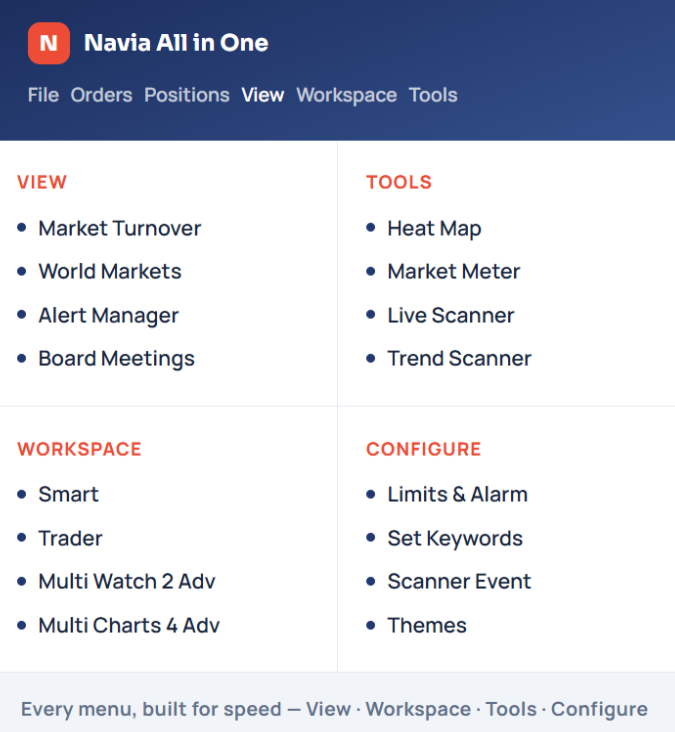
Navia Pro EXE supports multi-monitor setups and a customizable trading layout, allowing you to arrange your:
- watchlist,
- live charts,
- F&O chain with Greeks,
- positions, and
- order ticket based on your preferred workspace.
For active traders, configurable hotkeys can be used for order placement, including buy, sell, modify, and square-off actions, providing an alternative to mouse-based order entry.
The Navia Algo Suite
Navia Pro EXE brings algo trading, backtesting, and the built-in TradingView Bridge, alongside manual trading. These features are part of the Navia algo platform, which Navia describes as supported on mobile and web, with risk management controls, including an account-wide kill switch. The Navia Pro EXE application is free to download. Enabling EXE trading on your account carries a brokerage of ₹5 per traded order, and this rate then applies to all your orders across Web, Mobile and EXE once opted in.
Who Is It For?
Navia Pro EXE is designed for traders who actively monitor the markets, including:
- F&O traders managing multiple strikes and Greeks,
- intraday traders tracking market movements, and
- algo traders who want to access their strategies alongside manual trading within a dedicated desktop environment.
The countdown is on! Stay tuned to Navia’s communications for what’s coming next.
Key Takeaways
- Navia Pro EXE is a genuine Windows desktop trading application, designed specifically for desktop trading.
- It brings multiple market views, charts, watchlists and order management features into one environment, instead of switching between different tabs and screens.
- It supports multi-monitor setups and a customizable trading layout, letting you arrange your watchlist, live charts, positions and order ticket based on your preferred workspace.
- It is designed for traders who actively monitor the markets, including F&O traders and intraday traders tracking market movements.
- The Navia Pro EXE application is free to download. Enabling EXE trading carries a brokerage of ₹5 per traded order, and this rate then applies to all your orders across Web, Mobile and EXE once opted in.
- Pro EXE is a native Windows desktop application. Mac support may be introduced in the future based on product development and demand.
Did you find this article helpful?
Your feedback helps us write better content.

Frequently Asked Questions
Is Pro EXE Zero Brokerage?
No. The application is free, but enabling EXE trading carries a brokerage of ₹5 per traded order. Once opted in, this rate applies to all your orders across Web, Mobile and EXE.
Can I Use Pro EXE on Mac?
Pro EXE is a native Windows desktop application. Mac support may be introduced in the future based on product development and demand.
Do I Need Multiple Monitors?
No. Pro EXE can be used with a single, dual or multiple-monitor setup, allowing you to configure your desktop trading workspace based on your requirements.
Can I Use Algos Without Manual Trading?
Yes. You can use algo trading independently or combine algo trading with manual trading, depending on your preferred trading setup.
DISCLAIMER: Investment in securities market are subject to market risks, read all the related documents carefully before investing. The securities quoted are exemplary and are not recommendatory. Full disclaimer: https://bit.ly/naviadisclaimer.