Scalper · Workspace

Built for speed. Fast in, fast out.

The Scalper Workspace on Navia's trading platform — one tap to buy, one tap to close or reverse, your break-even price always in view.

Set up free account in 5 min
One of seven purpose-built workspaces on Navia Pro Web
1-tap
Quick Buy from the chain
1-click
Close or reverse a position
Live
Session P&L, always visible
Enforced
Session loss limit
What makes it different

Not a regular option chain

Every design decision here removes a step between spotting a setup and being in the trade.

One-tap Quick Buy

Tap directly on any option chain row — no separate order screen to open first. Configurable in Settings, with an optional stop loss to fire a Quick Cover order automatically.

Live position badges

The buy button becomes a live badge — side, quantity, average price, running P&L — right on the row you traded from.

One-click close & reverse

Flatten a position with X, or flip it to the opposite side with R — no re-navigating the chain.

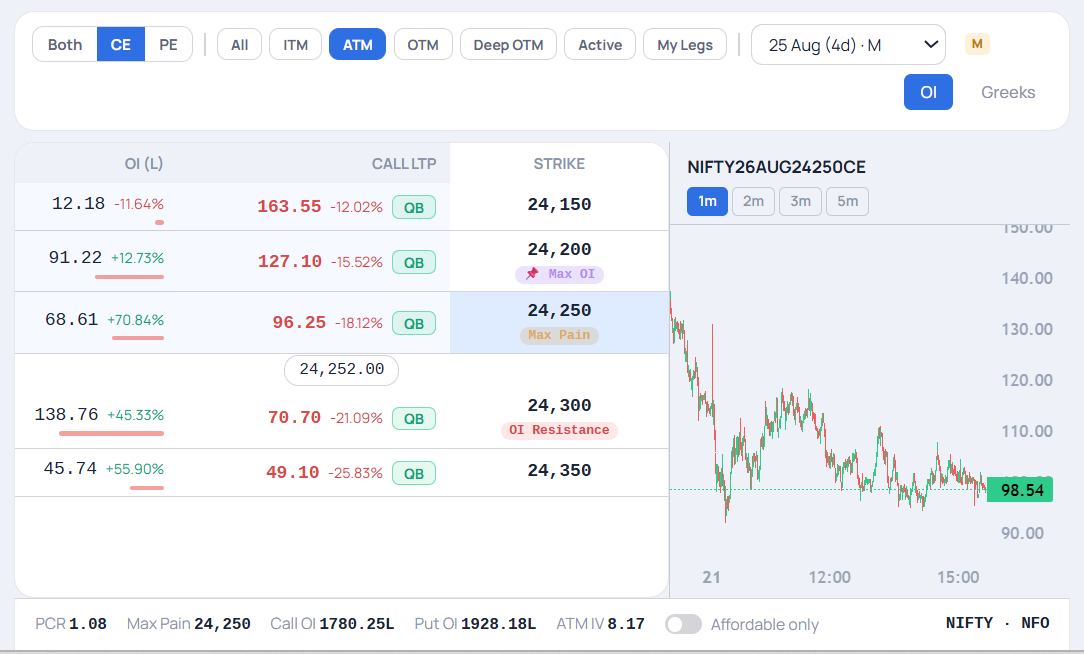
A dedicated mini chart

A live price chart of the underlying sits beside the option chain — switch between 1, 2, 3 or 5-minute candles, never more than a glance away from your setup.

Always-visible session P&L

Your running total sits in the workspace itself, not buried behind a tab switch.

An enforced session loss limit

Purpose-built for a style where a losing streak can compound fast — more on this below.

Built for speed

Four ways the Scalper Workspace saves you seconds

Every scalp is a race against the tape. These four are the ones that cut the most steps out of a trade — tap any to see it.

1Drag & drop your order, right on the chart
2One-tap Quick Buy from the option chain
3Live break-even price, updates as you type
4Live position & P&L on the chain — X to close, R to reverse
1Drag & drop your order, right on the chart
NIFTY26AUG24250CE
Scalper Chart
🖱️ Drag & Drop Orders
91.22 +12.7%
24,200
📍 Max OI
127.10 -15.5%
68.61 +70.8%
24,250
Max Pain
96.25 -18.1%
1m2m3m5m
98.54
✥ BUY LIMIT 108.20
Drag a price line straight onto the chart to place, edit or trail your order — no order pad, no typing.
2One-tap Quick Buy from the option chain
NIFTY Option Chain
28 AUG 2026 · WEEKLY
⚡ Quick Buy
CALL LTPSTRIKEPUT LTP
91.22 +12.73%
QB
24,200
📍 Max OI
127.10 -15.52%
QB
68.61 +70.84%
QB
24,250
Max Pain
96.25 -18.12%
QB
Spot 24,252.00
138.76 +45.33%
QB
24,300
OI Resistance
70.70 -21.09%
QB
45.74 +55.90%
QB
24,350
49.10 -25.83%
QB
Tap QB on any strike — order ticket pre-fills instantly, no navigation needed.
3Live break-even price, updates as you type
NIFTY26AUG24250CE
Scalper Order Ticket
🎯 Live Break-even
MKT
LIMIT
SL-L
SL-M
PRICE
33.00
BEP
i
₹33.10
Break-even (round trip)
Break-even cost₹0.10 /unit
Profit if sold above₹33.10
Round-trip charges (both legs)₹6.35
🎯
Break-even updates live as you type the price — know your exact profit zone before you place the order.
4Live position & P&L on the chain — X to close, R to reverse
NIFTY Option Chain
Scalper · Live Positions
⚡ 1-Tap Close/Reverse
STRIKECALL LTPPUT LTP
77,500
📍 Max OI
OI Support
254.90 -11.91%
14.46 -3.19%
PE · BUY 10 @ 180.1+₹48,620
R
77,600
Max Pain
293.60 -10.53%
QB
8.48 +0.27%
See your position and live P&L right on the strike — tap to close or R to reverse, instantly.
How it works

Five steps, one flow

1

Switch to the Scalper Workspace

One click from the workspace rail — chain filters, chart and quick-actions reconfigure instantly.

2

Set your session loss limit

A one-time setup per session — the maximum you're comfortable losing today.

3

Quick Buy from the chain

Filter by moneyness or side, then tap Quick Buy on the row you want.

4

Watch the badge and mini chart

Live P&L updates on the row you bought from; the chart stays beside the chain.

5

Close or reverse in one tap

X flattens the position; R reverses it instantly — no round trip through the chain.

Trading with more control

An enforced session loss limit

Genuinely blocked, not just flagged

Fast, frequent trading is exactly the pattern most exposed to a losing streak compounding quickly. Once your set limit is reached, new buy orders are genuinely blocked — continuing requires typing a full confirmation word, not a single tap. You can always still close or reduce existing positions; the block only ever applies to opening new risk.

This gives traders more information and more control before a trade is placed. It describes what the platform does — not a promise about trading outcomes.

Frequently asked questions

What is the break-even price (BEP) shown on the order form?

It's the price the option premium needs to reach for your position to turn profitable, after round-trip charges — brokerage, STT, exchange and other statutory costs for both the entry and the exit leg. Tap the info icon next to it to see the full breakup: break-even cost per unit, profit if sold above that level, and total round-trip charges for both legs. No separate calculation needed.

Is Quick Buy a market order?

Quick Buy uses your configured default order settings — you can set these to market or limit in platform settings. It skips the separate order screen, not your chosen order type.

Does the session loss limit reset automatically?

It's set once per session and applies for that session. You can adjust it before starting a new session.

Can I still close a position after hitting my loss limit?

Yes — the block only ever applies to opening new risk. Closing or reducing existing positions is always allowed.

What does the mini chart show?

A live price chart of the underlying, positioned beside the option chain — choose 1, 2, 3 or 5-minute candles so it's never more than a glance away while you scalp.

Is the order ticket different from other workspaces?

No — it's the same shared order ticket used across the platform. What's different in the Scalper Workspace is the context surfaced around it: live position badges, the mini chart, and the always-visible session P&L.
Trade at scalping speed

Switch to the Scalper Workspace on the Navia web platform — or try it in guest mode first, no account needed.