No ticket, no second window, no looking away from price. Tap any point to see it.
Multi-watchlist rail on the left, and the U + C + P layout on the right: the underlying future charted beside its Call and Put, all on the same interval with a synced crosshair. 1-Tap ON, BUY @ MKT and SELL @ MKT sit in the header, a draggable New Order handle is live on the Call pane, and DEPTH / CHAIN / HEATMAP are a tab away.
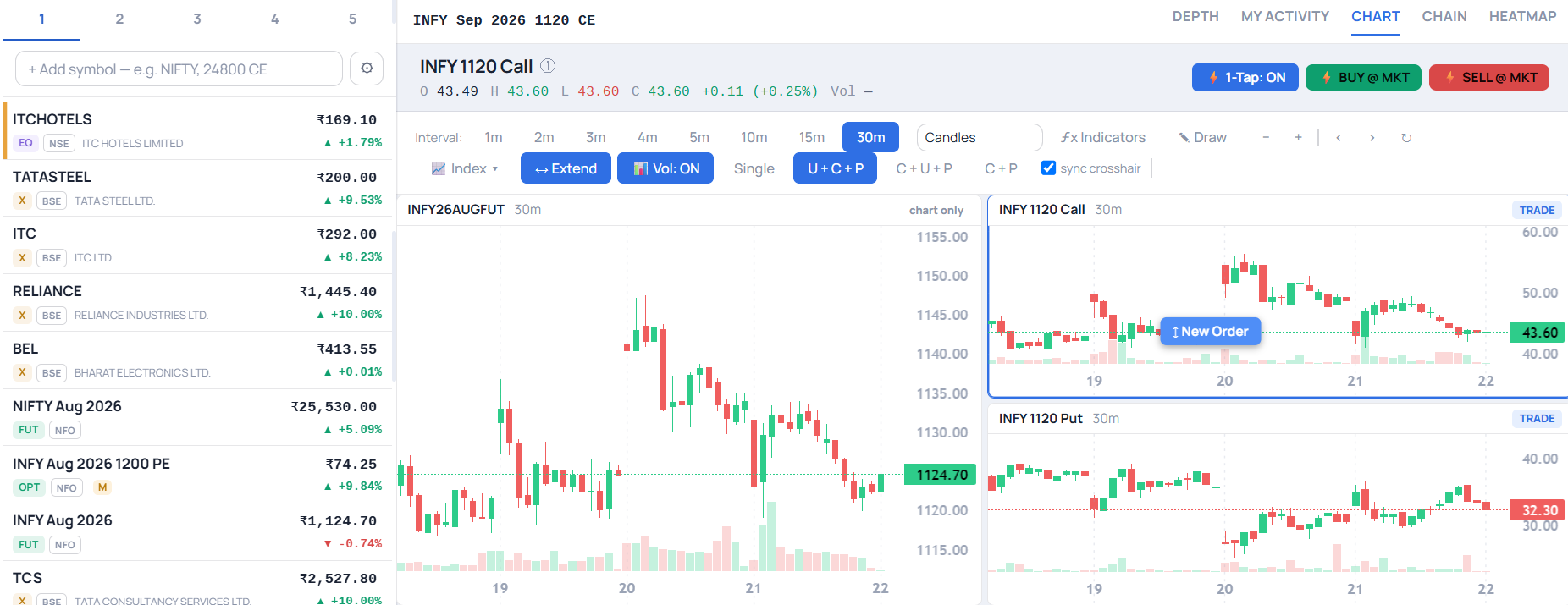
Most platforms split your attention — a chart to analyse on one side, an order ticket to execute on the other. Chart Trader closes that gap. One idea runs through the whole workspace: the chart is where the decision happens, so the chart is where the trade should happen too.
Every design decision here removes a step between spotting a level and being in the trade.
Drag the "New Order" handle to any level. A live preview shows price and side as you move; drop it, choose Buy or Sell, and the order goes in — right where you were looking.
Every working order is a line on the chart at its price. Grab it and drag to re-price — no reopening a ticket, no re-typing.
Done with an order? Cancel it straight from its line — no round-trip to the order book.
Open positions are drawn on the chart with their live P&L in context against price — square off right from the line when you're ready.
Drop a buy above the market — or a sell below it — and it's placed as a stop order, not one that fires instantly. A trigger price behaves like a trigger.
Order and position lines refresh continuously and re-anchor as price moves — what's on the chart is always what's live in the market.
Options never move in isolation. Chart Trader's multi-pane layouts put the pieces that matter side by side on one screen — load an index, future or option and it builds a view of the underlying alongside its at-the-money Call and Put, with the ATM strikes resolved automatically from the live chain.
Good chart decisions need a constant sense of where you stand. Keeping that number in front of you the whole session makes it easier to stick to your plan, protect your gains, and step away at the right moment.
Realised + unrealised, across every open position, updating in real time — one trusted number, always in view.
Every tool here earns its place on the screen — and anything that doesn't gets out of the way.
One click from the workspace rail — the chart becomes your primary surface.
Underlying + Call + Put, a focused Call/Put pair, or a multi-timeframe grid — whichever fits the trade.
Drop "New Order" at your level; drag any working order's line to re-price it.
Square off a position with one tap; your Total P&L stays live in the top bar throughout.
A dedicated Navia workspace where you analyse and trade on the same screen — placing and modifying orders directly on the chart, with multi-pane options views and a live P&L badge.
Active intraday and F&O traders who make decisions off the chart and want to act on their levels instantly, without switching to a separate order ticket.
Drag the "New Order" handle to a price to place one; drag an existing order's line to re-price it; and cancel an order — or close a position — right from its line on the chart. No order ticket to reopen.
Yes. The multi-pane layouts show the underlying together with its at-the-money Call and Put, resolved automatically from the live option chain.
Your total realised + unrealised P&L is always in the top bar and updates live as the market moves.
Chart Trader is smart about order types — a buy dropped above the market (or a sell dropped below it) is placed as a stop order instead of one that would fire instantly, so a price you meant as a trigger behaves like one.
No — Chart Trader is one of the workspaces inside your Navia trading platform. Switch to it anytime.
Chart Trader puts your analysis and your execution on the same surface — so the moment you see the trade, you can take it.