Index Trader · Workspace

The Option Chain + Chart is your Workspace.

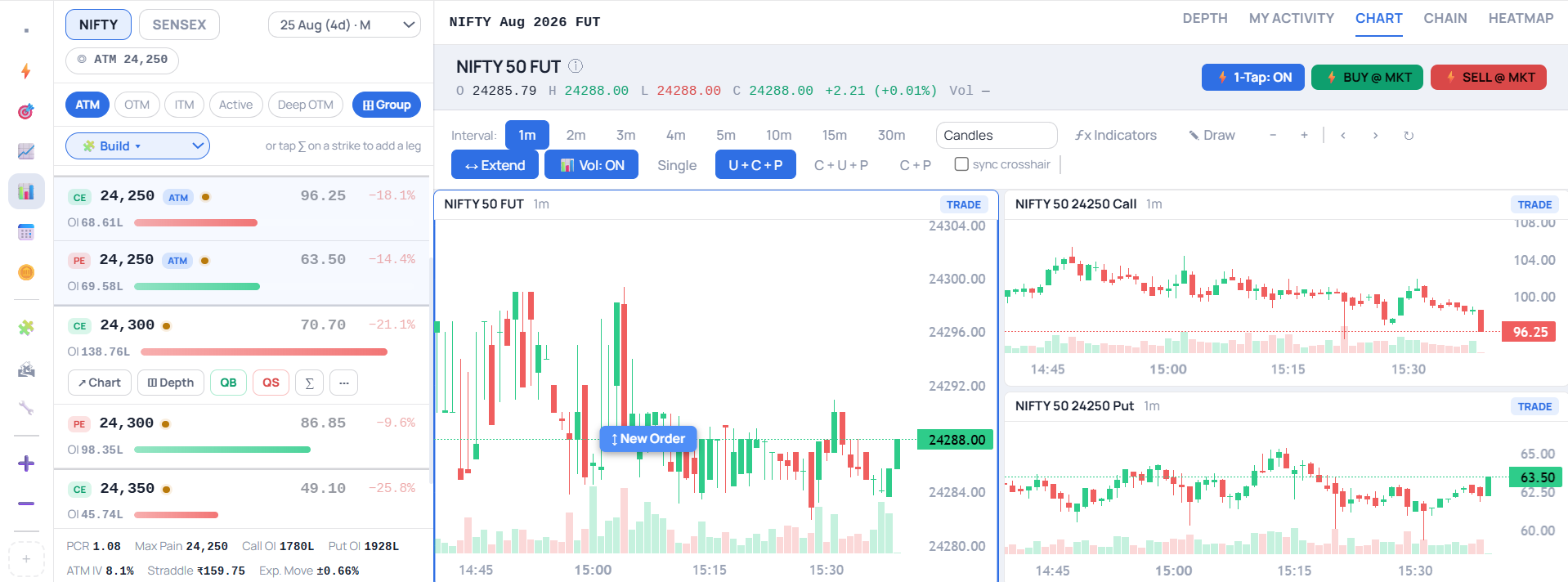
NIFTY and SENSEX, on one screen — the chain you'd trade is the watchlist, the Future is charted beside its ATM Call and Put, and every strike is one hover away from a trade.

Set up free account in 5 min
One of seven purpose-built workspaces on Navia Pro Web
Live
Option chain as your watchlist
F+C+P
Future, ATM Call & Put, charted
1-hover
Chart, depth or trade any strike
Enforced
Session loss limit
Built for index traders

Four things that make Index Trader different

The chain you'd trade is the watchlist. Tap any point to see it.

1Calls and Puts grouped on one row per strike — filter to ATM, OTM, ITM or just the active strikes
2The live chain is your watchlist — OI bars, and Chart / Depth / Quick Buy / Quick Sell on hover
3Drag a price line onto the chart to buy or sell — no order pad, no typing
4Your live position, P&L, Reverse and Close all sit right on the chart
1Grouped by same strike — ATM / OTM / ITM filters
ATMOTMITMActiveDeep OTM ⊞ Group
CE24,250ATM96.25−18.1%
OI 68.61L
↗ Chart▥ DepthQBQS···
PE24,250ATM63.50−14.4%
OI 69.58L
2The live option chain, as your watchlist
24,200127.10−15.5%
OI 91.22L
↗ Chart▥ DepthQBQS···
SPOT  24,252
▼ PUTS · ATM
24,20044.65−20.8%
OI 155.03L
3Drag & drop to buy or sell, on the chart
NIFTY 50 24300 Call1mTRADE
76.00
↕ New OrderBUY SL-M / SELL LIMIT @ 73.3273.32
72.00
70.70
14:4515:0015:1515:30
4Live position P&L, Reverse and Close — on the chart
340.00
320.00
NET +8 · ₹−275.76 (−11.14%)⇄ RevClose POS CNC +8309.32
300.00
280.00
↕ New Order
260.00
265.99
Built for how India trades

Not a screen you visit. A workspace you live in.

The overwhelming majority of India's derivatives volume trades in a handful of index products — NIFTY, SENSEX, and their options and futures. Index Trader is a Navia workspace built around that reality, instead of bending a generic stock screen to fit it. The left of your screen isn't a watchlist you fill by searching — it's the selected index's live option chain, Calls above and Puts below. The centre and right aren't a lone chart — they're the Future charted beside its at-the-money Call and Put. And the bottom reads the chain's positioning, live: PCR, Max Pain, open interest, implied volatility and the market's own expected move.

Theme 1

Your watchlist is the option chain

No hunting for symbols. The strikes you'd actually trade — Calls above, Puts below — are the live left column of the workspace.

Calls and Puts, live

Strike, last price, % change and open interest for every row — with an OI strength bar so the heavy strikes stand out at a glance.

Jump to the strikes that matter

One-tap moneyness filters — ATM, OTM, ITM, Deep OTM, and Active (most-traded by OI). Opens at the money; recenter in a tap.

NIFTY and SENSEX at a tap

Switch the whole workspace between indices from the header — chain, charts and analytics all follow the index you pick.

Group Calls and Puts by strike

Flip to a grouped view stacking each strike's Call directly above its Put, for a fast side-by-side read of both legs.

Spot, right where the money is

A live spot marker sits between the Calls and the Puts, so the at-the-money line is always obvious as price moves.

Know when a quote is stale

Thinly-traded strikes that haven't ticked in a while are quietly flagged — a real safeguard out in the far-OTM strikes.

Theme 2

Future + Call + Put, on one screen

The index doesn't trade in isolation from its options. Index Trader charts the Future and its at-the-money Call and Put together, automatically.

The default that fits index trading

Future left, ATM Call top-right, ATM Put bottom-right — current-month future and ATM strikes resolved automatically from the live chain.

Chart any strike in a click

Hover any row and hit Chart to pull that strike onto the canvas — the F+C+P layout rebuilds around it, not just the ATM.

Layouts for the trade in front of you

Future + Call + Put, Call + Future + Put, or a focused Call + Put pair — or a single chart of any strike.

Synced crosshair across panes

Hover one chart and the crosshair tracks the same instant across all of them — always reading the same moment on Future, Call and Put.

Opens fast, on the 1-minute

Index options move quickly — charts open on 1-minute by default, with intraday intervals one tap away.

A serious charting surface, included

Drag orders onto the candles, see working orders and positions as lines, drawing tools, volume, candle-close countdown, zoom and pan.

Theme 3

Trade the strike without leaving the chain

Every strike in the chain is one hover away from acting on it.

Actions on every row

Hover a strike and it reveals Chart, Depth, Buy/Sell and a quick menu — inspect or trade it without opening anything else.

Depth, inline and on demand

Click Depth for a compact five-level bid/ask beneath the row — subscribes only while open, so it's quiet the rest of the time.

Buy and Sell that adapt to your screen

B/S fill your order ticket for a final check; when charts are extended, the same buttons become QB/QS — Quick Buy and Quick Sell.

A quick menu for the rest

The three-dot menu adds Quick Buy, Quick Sell and Set Alert for any strike, straight from its row.

Keyboard-fast

Arrow up and down through the strikes and press Enter to chart one — hands on the keys, eyes on the chain.

Depth without the clutter

One inline five-level book per strike — no separate depth window to open, position, or forget about.

Theme 4

Read the market's positioning at a glance

The chain is telling you where the market is leaning. Index Trader reads it for you, live, right under the strikes.

The numbers that matter, always on

PCR, Max Pain, total Call and Put OI, ATM implied volatility, the ATM straddle price and the expected move — computed live, in a compact strip that's never in the way.

The market's own expected move

See the ±% move by expiry the options market is pricing in — from the ATM straddle — before you take a position, not after.

An expiry-day heads-up

On expiry day, the workspace surfaces a reminder that gamma peaks near the ATM strike and premiums swing and decay fastest right there — a nudge to size down at exactly the moment it matters most.

Ready to trade the chain?

Set up your free Navia account in 5 minutes and switch to Index Trader.

How it works

Five steps, one flow

1

Switch to Index Trader

One click from the workspace rail — the chain, charts and analytics load for your chosen index.

2

Pick NIFTY or SENSEX

The whole workspace — chain, F+C+P chart and positioning strip — follows the index you select.

3

Filter to the strikes you trade

ATM, OTM, ITM, Deep OTM or Active — one tap narrows the chain to the window you care about.

4

Read the chain, watch the charts

PCR, Max Pain and Expected Move underneath; Future, ATM Call and ATM Put charted beside each other.

5

Trade the strike from its row

Hover, hit Buy/Sell or Quick Buy/Sell — the trade goes in without ever leaving the chain.

Discipline for fast markets

An enforced session loss limit

Genuinely blocked, not just flagged

Index F&O rewards speed but punishes tilt. Your live Total P&L — realised plus unrealised across every open position — sits in the top bar the whole session. Set a rupee limit once, and the moment your total P&L crosses it, new orders are genuinely blocked until you deliberately choose to continue. Quick Buy and Quick Sell still place through your own Quick Order settings — quantity, product, order type and a maximum order-value cap — so even your fastest trades respect the rules you set for yourself.

This gives traders more information and more control before a trade is placed. It describes what the platform does — not a promise about trading outcomes.

Frequently asked questions

What is the Index Trader workspace?

A dedicated Navia workspace built for index F&O. Instead of a generic watchlist, your left column is the live option chain of the selected index; the Future is charted beside its at-the-money Call and Put; and the chain's key analytics sit right underneath — so you can read positioning and act on it on one screen.

Who is it for?

Active index options and futures traders — the traders who spend their day in NIFTY and SENSEX and want the chain, the charts and the order all in one place.

Which indices does it support?

NIFTY and SENSEX, switchable in a tap from the header or the common top menu — the whole workspace follows the index you choose.

How is it different from a normal option chain?

A normal chain is something you look at. Here the chain is the workspace: filter it by moneyness, chart any strike, open a strike's depth inline, and place an order — Buy/Sell or Quick Buy/Sell — straight from the row.

What's the default chart view?

The index Future with its at-the-money Call and Put, side by side — the F+C+P layout — with the current-month future and ATM strikes resolved automatically. You can switch layouts, expand any pane, or chart any strike you like.

How do I trade a strike?

Hover its row and use Buy/Sell to fill your order ticket, or Quick Buy/Sell to place instantly via your Quick Order settings when the charts are covering the ticket. The three-dot menu also offers Quick Buy, Quick Sell and Set Alert.

What is "Expected Move"?

It's the ±% move in the index that the options market is pricing in by this expiry, read from the at-the-money straddle. It gives you the range the market itself expects before you take a position.

Does the session loss limit really block orders?

Yes. Once your total P&L crosses the limit you set, new orders are stopped until you deliberately choose to continue — it's an enforced guardrail, not just a notification.

Do I need a separate app or login?

No — Index Trader is one of the workspaces inside Navia Pro Web. Switch to it anytime.

ATM — At-the-money strike PCR — Put/Call Ratio OI — Open Interest Max Pain — Strike of least option-writer loss

The workspace built for how India trades derivatives.

NIFTY and SENSEX, their options and futures, on one screen — read the chain, see the strikes charted beside the Future, and trade them without ever leaving the workspace.