A live countdown to settlement, an enforced session loss limit, and at-the-money defaults where the swings are sharpest — the most cautious workspace on the platform, for the riskiest window in options trading.
Expiry day gives you no room to react late. Tap any point to see how the workspace handles it.
Expiry-day options move differently — this workspace is designed around that, not despite it.
A running hours:minutes:seconds countdown to 15:25 IST — the exact exchange settlement time — always visible.
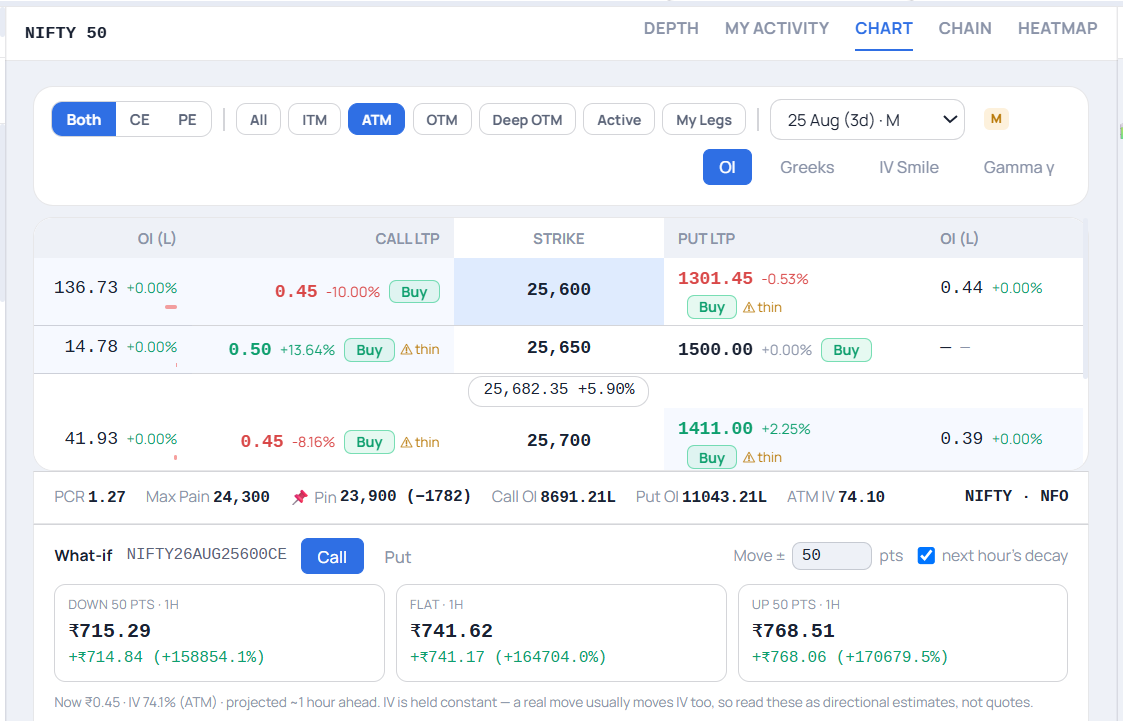
The chain opens on ATM strikes by default, where the swings this workspace exists for are sharpest — other strikes are still one tap away.
Set your maximum acceptable loss once — new buy orders are genuinely blocked platform-wide once it's hit, not just flagged.
Continuing past your loss limit requires typing a full confirmation word — never a single accidental tap.
A short, specific explanation of expiry-hour options behavior, with an active confirmation required before your first session.
Strikes with thin trading activity are flagged directly — the last-traded price may not be what you'd actually get filled at.
From opening the workspace to placing your first trade.
A one-time confirmation on first use, before the workspace opens.
The maximum you're comfortable losing today — enforced, not just advisory.
Opens on at-the-money strikes by default, with liquidity warnings where relevant.
The live clock to 15:25 IST keeps you oriented as the window narrows.
Pick a strike, set a move in points, and the What-if panel projects the premium about an hour ahead — down, flat and up — with next hour's decay applied.

Three scenario cards — down 50 pts, flat, up 50 pts — show the projected premium and change, alongside PCR, Max Pain, Call/Put OI and ATM IV. Navia states the assumption openly: IV is held constant, so read these as directional estimates, not quotes.
Expiry-day options carry well-documented, elevated risk. This workspace is built to give you more information and more control before a trade goes in — not to promise a particular outcome.
The session loss limit genuinely blocks new buy orders once hit — closing or reducing existing positions is always still allowed.
You confirm you understand expiry-hour risk once, before your first session — not buried in terms you never see.
Thin strikes are flagged directly, so a quoted price is never mistaken for a guaranteed fill.
Everything you need to know about the Expiry Trader Workspace.
15:25 IST, the exchange's expiry settlement time — shown live in hours, minutes and seconds so you always know exactly how much time is left.
ATM strikes see the sharpest price swings in the final hours before expiry, which is exactly the window this workspace is built for — you can still browse other strikes anytime.
New buy orders are blocked platform-wide. Continuing past the limit requires typing a full confirmation word, not a single tap. Closing or reducing existing positions is always still allowed.
A short, specific explanation of why options behave differently in the last hour before expiry, with an active confirmation required before your first session in this workspace.
They flag strikes where the last-traded price may not reflect what you'd actually get filled at, due to thin trading activity — a common risk on far strikes close to expiry.
Switch to the Expiry Trader Workspace on Navia's web platform — or try the guest demo first, no account needed.