Technology

A platform that adapts to how you actually trade.

One platform. Seven workspaces. Built for how you actually trade.

Most trading platforms give every user the same screen. Navia's web trading platform adapts instead — seven purpose-built workspaces, switchable in one click, each with its own tools and its own guardrails.

Set up free account in 5 min
Free to explore in guest mode · No account needed to try it
7
Purpose-built workspaces
1-click
Instant workspace switching
Live
Enforced session loss limits
₹0
Brokerage, for life
Tools most retail platforms skip

Eight things you won't find on a generic screen

Analytics and guardrails built into the workspaces themselves. Tap any point to see it.

1IV Smile — spot mispriced options across the chain
2Strategy charts with the underlying overlaid
3Cover & bracket orders — SL, Trail and Target in one order
4Live position badge on the chain, close or reverse in one tap
5Maximum possible loss on every buy button
6Position sizing from your risk, in whole lots
7Countdown to settlement, with Square Off All and Cancel All
8Sector heatmap — where the money moved today, at a glance
1IV Smile — identify mispriced options
IV Smile · NIFTY This week
24.0k
24.2k
24.4k
ATM
24.6k
24.8k
25.0k
Puts are pricing more risk than calls right now. The curve's shape flags strikes that look mispriced relative to their neighbours.
2Strategy chart with the underlying
Strategy chart · Bull Call Spread 5m
₹ 148.60
Strategy premiumUnderlying
The strategy's own traded price, overlaid on the underlying — not a theoretical payoff line.
3Cover & bracket order
Cover & bracket order
Stop Loss✎ edit
20% → ₹2,352 (−₹588 max loss)
Stop Loss Trail✎ edit
Trails SL by 5% as price moves your way
Target✎ edit
50% → ₹3,058 (+₹1,470 target)
Placed as: Bracket Order (SL + Trail + Target)
4Live position badge, one-tap close/reverse
Scalper · live position on the chain
24,800ATM96.25
LONG 1avg 94.10+₹1,612R
24,85062.40
QBQS
✕ closes it, R reverses it — P&L updates live, no ticket needed.
5Max loss on every buy button
OTM Trader · max loss on every button
25,0000.8% OTM18.40
BuyMax possible loss: ₹1,380 · Decay by tomorrow: −₹510↗ Chart
25,1001.2% OTM9.20
Over your ₹500 budget — labeled, not hidden
6Position size calculator
Position size calculator
Risk per trade₹ 2,000
Entry premium96.25
Stop loss70.00
Maximum quantity within budget
1 lot (75 qty)
Risk at stop: ₹1,968 of ₹2,000
7Countdown expiry timer
02:26:46 + ₹10,000 ₹0/limit
8Sector heatmap — where the money moved
NIFTY Sector Heatmap 1 Day
Energy+1.32%
IT+4.86%
Auto+1.44%
FMCG+0.74%
Fin. Services+7.68%
Pharma+1.54%
Metal+0.82%
Consumer Durables+0.74%
Realty+1.17%
Media+1.58%
< -2%-2%-1%+1%+2%> +2%
The core differentiator

Seven workspaces, one click apart

Each workspace has different default behavior, different information surfaced, different quick-actions — and where the risk is highest, different, genuinely enforced guardrails.

The whole platform on one screen

Five switchable watchlists on the left — equities, futures and options together, with colour-coded exchange and segment tags — and the charting surface on the right: the underlying future beside its Call and Put on a shared crosshair, a draggable New Order handle live on the chart, 1-Tap trading with BUY @ MKT and SELL @ MKT in the header, and DEPTH / CHAIN / HEATMAP a single tab away.
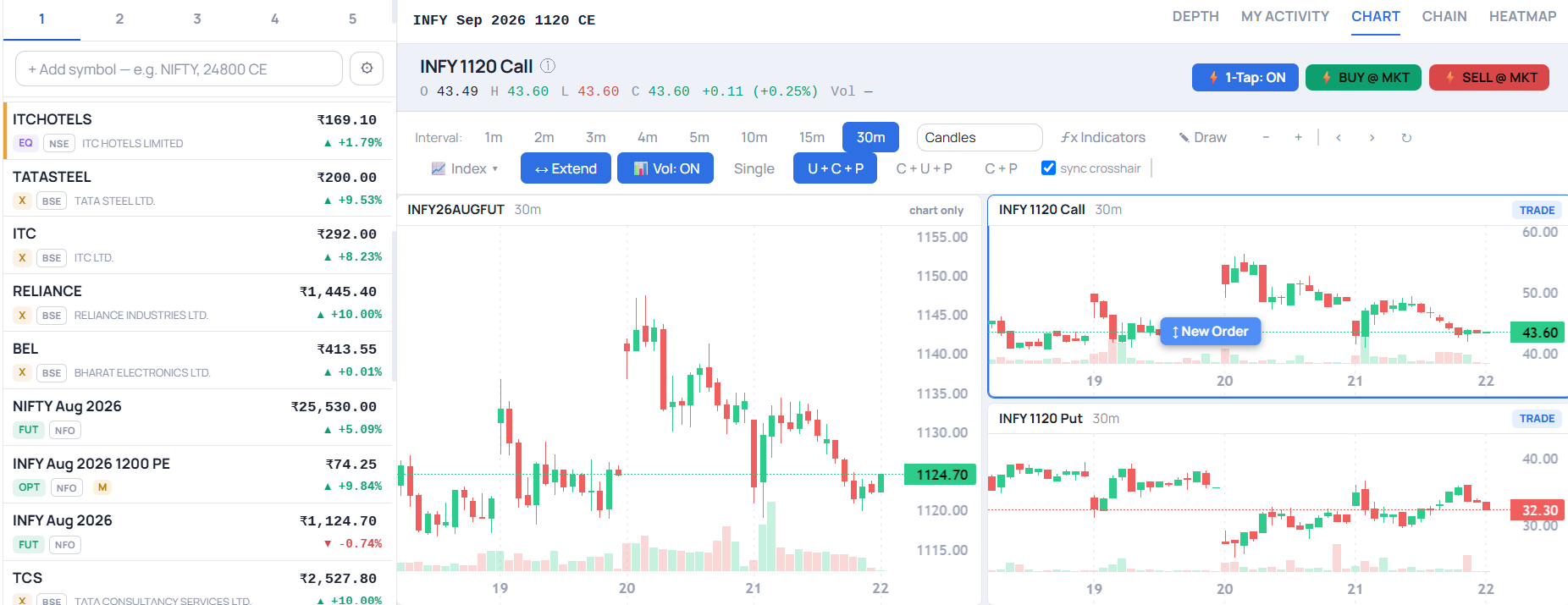
Navia Pro Web — multi-watchlist rail beside a synced underlying, Call and Put chart layout with a draggable New Order handle, 1-Tap trading controls and Depth, Chain and Heatmap tabs
Beyond the workspaces

Tools and capabilities most retail platforms don't offer

Analysis and execution built into the workspaces themselves — and the analytical tools all share one consistent calculation engine, not several different approximations scattered across the platform.

IV Smile

Implied volatility across the whole option chain, strike by strike — with a plain-English read on which side is pricing in more risk, framed as a snapshot, not a forecast.

Advanced Strategy Builder

Build multi-leg positions leg by leg or from a template library. The "Easy Options" flow turns a market view into a matched shortlist, margin estimate included.

Strategy charts with underlying

For any multi-leg strategy, chart the position's own total premium overlaid on the underlying — see how the whole structure has actually priced against the market, not a theoretical payoff line.

Greek Analyzer

Live Delta, Gamma, Theta, Vega and IV for every contract, computed from real-time prices. One click swaps the chain between Open Interest and Greeks.

Position-Size Calculator

Enter what you're willing to risk and your stop level; it calculates the maximum quantity that stays in budget, rounded to a whole lot.

One shared order ticket

The same fast order flow in every workspace, with extra context — like the contract spec panel or the sizing calculator — layered in only where relevant.

Trade directly from the chart

In Chart Trader, drag a handle to any price to place an order, drag its line to re-price it, and close or reverse a position from the line itself — live P&L alongside price, no ticket needed.

Multi-chart layouts

1, 2 or 4 synced panes with independent intervals — or the underlying charted beside its ATM Call and Put with a shared crosshair, so one price move reads across all three at once.

Basket orders

Assemble several orders — or a whole multi-leg strategy — and fire them together in one go, with a combined margin estimate before you commit.

Open Interest & Max Pain

Call and Put OI side by side on the chain, with Max Pain and OI-resistance markers plus a PCR read — the positioning picture, without leaving the strike you're looking at.

Cover & bracket orders

Attach a stop loss, a trailing stop and a target to a single order — each shown in both percentage and rupee terms, so the risk is stated before you place it.

Panic controls, always in reach

Square Off All and Cancel All sit in the top bar of every workspace — one tap to flatten every open position or pull every pending order at once.

What-if analysis

Before you commit, see what the premium does: enter a move in the underlying and get projected premiums for a move down, flat and up — with the option to include the next hour's time decay. Especially useful for OTM buyers judging whether a strike can actually get there.

Pre-defined watchlists

Ready-made lists you can load in a tap — NIFTY, BANKNIFTY, FINNIFTY, ETFs, sector baskets, and for commodities the Energy, Bullion and Metal segments, each auto-populated with the currently active contracts so nothing goes stale as they roll over.

Grouped, colour-coded watchlists

Options group by strike so the Call and Put of the same strike sit together as one row, with exchange and segment tags colour-coded at a glance — up to five watchlists, each holding as many as thirty instruments.

Trading with more control

Guardrails built where the risk is highest

More information and more friction before risk is taken — built directly into the workspaces where it matters most.

Enforced session loss limits

Set your own maximum acceptable loss once. When it's reached, new buy orders are genuinely blocked — continuing requires typing a full confirmation word, not a single tap. Closing or reducing positions is always still allowed.

Risk acknowledgment

Before your first session in Expiry Trader, a short, specific explanation of why last-hour options behave the way they do — with active confirmation required to continue.

Budget-based trading

OTM Trader runs entirely on a budget you set upfront. Contracts that don't fit are labeled, not hidden, and every buy button shows maximum possible loss before you place the order.

Delivery & liquidity warnings

Physically-settled commodity contracts nearing delivery are flagged directly, and thin option strikes carry a warning that the last-traded price may not reflect your actual fill.

These features give traders more information and more control before a trade is placed. They describe what the platform does — not a promise about trading outcomes.

Underneath it all

Fast and consistent, everywhere

Live, real-time updates throughout — positions, watchlists, option chains and P&L, all from a live feed.

Instant workspace switching from a single rail — badges, filters and defaults reconfigure automatically.

Inline quick-actions on every watchlist row — chart, option chain or a quick buy/sell, without leaving the list.

Readable Indian numbering — lakh/crore notation with hover detail, not long-form figures.

Guest/demo mode with realistic sample data — explore the real interface before creating an account.

PIN lock & auto-lock for securing the platform on a shared or mobile device.

Getting started with options

Easy Options — three taps to your first strategy

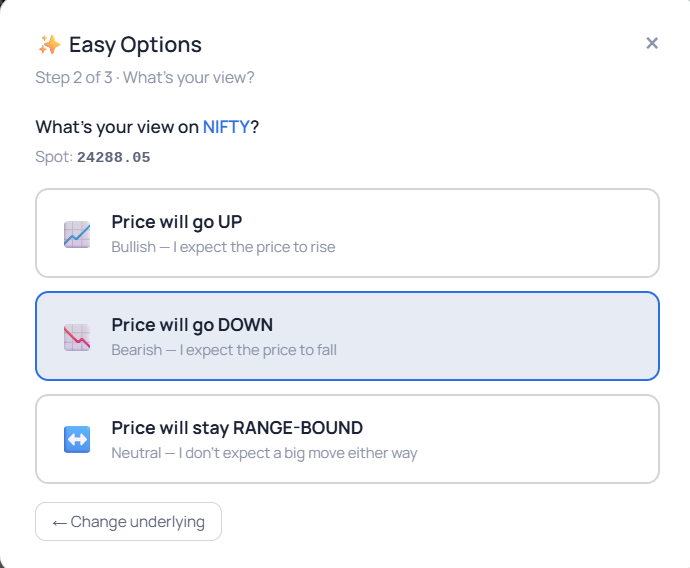
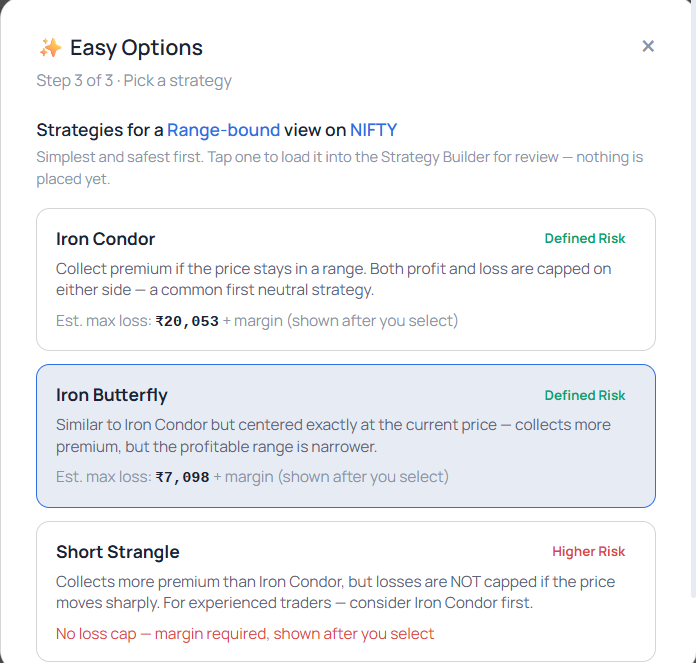
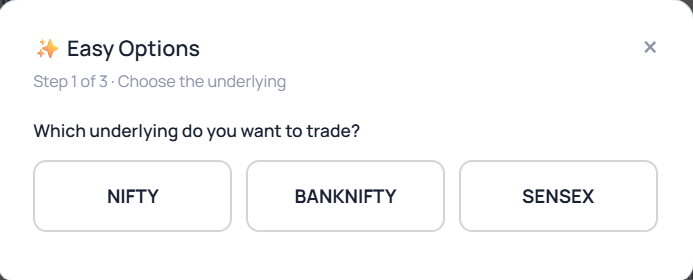
Not sure where to start with options? Pick your underlying, say what you expect the price to do, and get a curated shortlist of strategies matched to that view — with an upfront max-loss estimate before you commit to anything.

1 Choose the underlying — NIFTY, BANKNIFTY, SENSEX
2 Pick your view — bullish, bearish or range-bound
3 Get a matched shortlist, ranked simplest and safest first
Easy Options step 1 — choose underlying Easy Options step 2 — pick your view Easy Options step 3 — pick a strategy

Frequently asked questions

What makes the workspaces different from just a theme or color scheme?

Each workspace has different default behavior, different information surfaced, different quick-actions, and — in the highest-risk workspaces — genuinely enforced guardrails. It's not a visual skin; the underlying logic changes.

Can I switch workspaces without losing my open positions or orders?

Yes — workspace switching is instant and only changes what's shown and how it's organized. Your positions, orders and holdings are the same account, visible from every workspace.

Do the session loss limits actually block trading, or just show a warning?

In the Scalper and Expiry Trader workspaces, once your set limit is reached, new buy orders are genuinely blocked. Continuing requires typing a full confirmation word. You can always still close or reduce existing positions.

Is the IV Smile a prediction of where volatility is headed?

No — it's explicitly framed as a snapshot of implied volatility across the chain right now, not a forecast. The skew moves through the session, especially in the final hour before expiry.

Can I try the platform without opening an account?

Yes — guest/demo mode has realistic, fully-populated sample data (positions, holdings, a watchlist, order history) so you can explore the real interface with no real money and no commitment.

Is the Commodity Trader workspace only for MCX futures?

It's organized around MCX segments — Energy, Bullion and Metal — with live futures contracts, real contract specs, and delivery-window warnings specific to physically-settled commodity contracts.

Trade the way you actually trade

Explore all seven workspaces on Navia Pro Web — or try the guest demo first, no account needed.