Energy, Bullion and Metal — three segmented watchlists that auto-populate with the real, active contracts, and contract specs that never leave you guessing.
Which contract is live, and what a lot actually is. Tap either point to see it.
Segmented contract watchlist on the left, the full option chain on the right — moneyness filters, OI and Greeks toggle, Max Pain and OI Resistance markers, and quick B/S actions on hover. PCR, Max Pain, Call/Put OI and ATM IV sit in a summary strip along the bottom.
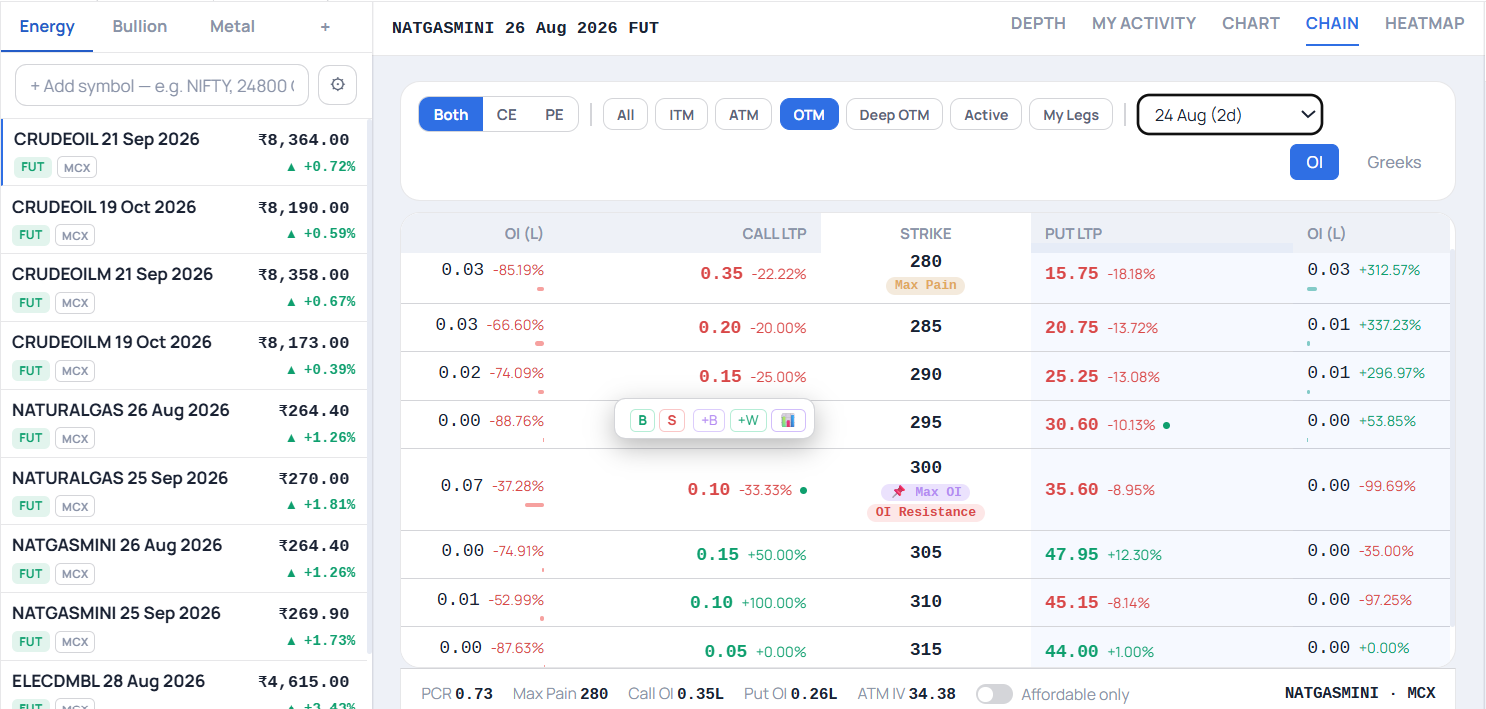
Each watchlist auto-populates with the real, currently active futures contracts — nothing goes stale as contracts roll over.
The active-month contracts for energy commodities, refreshed automatically as expiries roll.
Gold and Silver contracts across their standard and mini variants, always showing the currently traded series.
Base metals grouped together, with the active contract for each surfaced by default.
Replaces the equity-index chips that don't apply here — commodity prices move with the dollar-rupee rate, so it's front and center.
Real lot size and settlement type for the contract you've selected — no separate lookup required.
Physically-settled contracts get flagged directly as they approach their tender/delivery window.
The same charting, order ticket and position management used across the platform, tuned for commodity segments.
Watchlists and charts update from a live feed, not periodic polling — the same standard as every other workspace.
Move between this and any other workspace instantly from the same rail — no separate login or reload.
From opening the workspace to placing your first trade.
One tap from the workspace rail — the three segment watchlists load immediately.
Energy, Bullion or Metal — each shows only its currently active contracts.
Lot size and settlement type are shown before you commit to an order.
Physically-settled contracts flag their tender window automatically as it approaches.
Commodity contracts carry obligations that equity and index derivatives don't — this workspace surfaces them rather than leaving you to remember.
Physically-settled contracts approaching their tender window are called out directly, not left for you to track manually.
Lot size and settlement type are shown upfront so you know exactly what a contract commits you to before you trade it.
Watchlists auto-populate with the currently active series, so you're never accidentally trading an expiring contract by mistake.
Everything you need to know about the Commodity Trader Workspace.
Three segmented watchlists — Energy, Bullion and Metal — each auto-populated with the real, currently active futures contracts in that segment.
No — each segment watchlist auto-populates with the currently active contracts, so nothing goes stale as older contracts expire and new ones become active.
Commodity prices are heavily influenced by the dollar-rupee rate, so live USD/INR (or exchange sector indices, where available) replaces the equity-index chips that don't make sense in a commodity context.
Real lot size and settlement type for the selected contract, so you know exactly what you're trading before you place an order.
It flags when a physically-settled contract is approaching its tender/delivery window, which carries different obligations than a cash-settled position.
Switch to the Commodity Trader Workspace on Navia's web platform — or try the guest demo first, no account needed.